How Do You Deploy Redis Safely on Kubernetes?
Learn how to deploy Redis safely on Kubernetes, including persistence, failover, memory tuning, operators, backups, and production tradeoffs.
How Do You Deploy Redis Safely on Kubernetes?
Redis is one of the most common stateful services teams try to run on Kubernetes, and for good reason. It is used for caching, session storage, rate limiting, job queues, and transient application state. But Redis is not a stateless web service, and that distinction matters a lot in production.
Running Redis safely on Kubernetes means thinking about persistence, memory pressure, failover, replica behavior, and recovery. If those pieces are not designed carefully, the cluster may start Redis successfully but still lose data, degrade under load, or fail in a way that is hard to recover from.
This article explains how to deploy Redis safely on Kubernetes, the common approaches teams use, the tradeoffs involved, and how to build a production-ready model across Kubernetes and k3s.
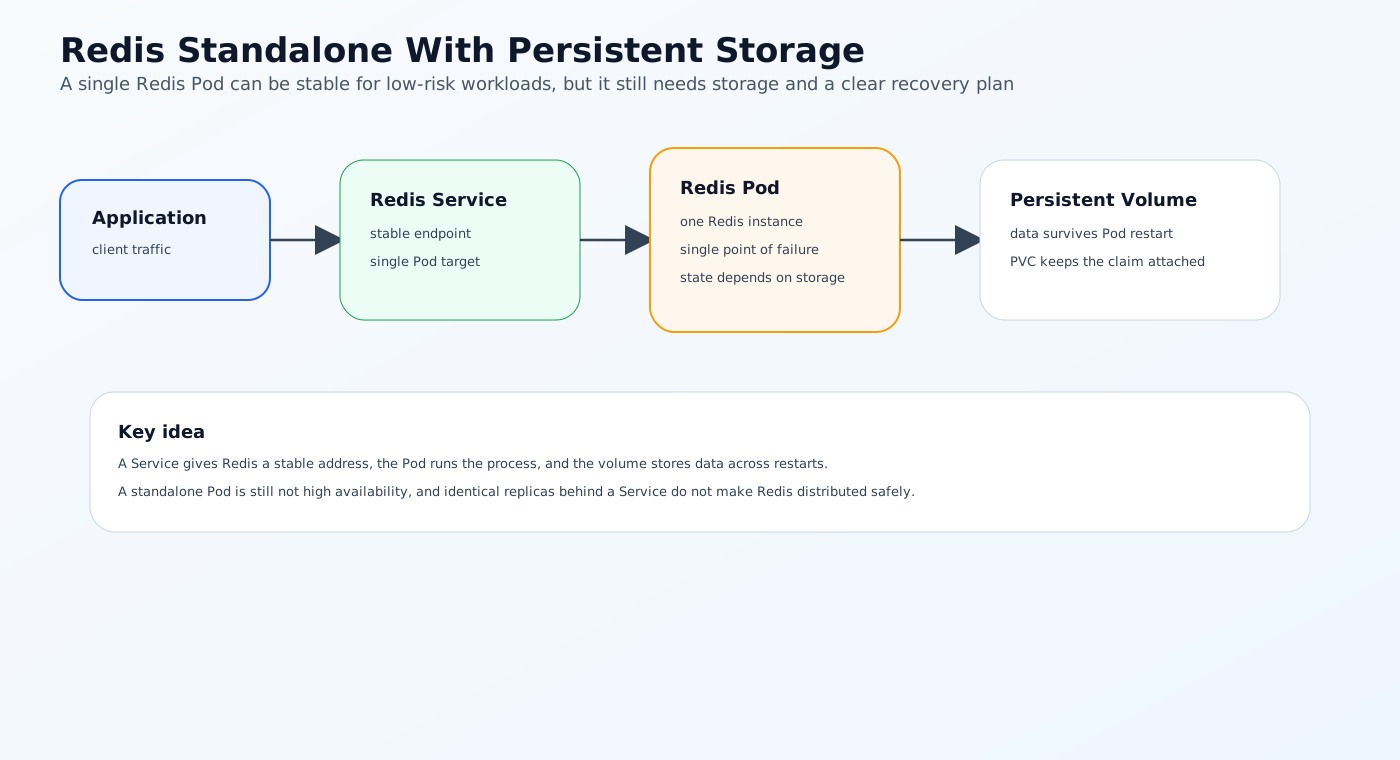
The Problem: Redis Is Fast, But It Is Still Stateful
Redis is often treated like an ephemeral in-memory cache, but in production it frequently carries important application state.
That creates a tension:
- Kubernetes expects workloads to be rescheduled and replaced
- Redis expects data durability, memory stability, and controlled recovery
Those are not the same operational model.
Why Redis is different from a normal Deployment
A Redis pod can be restarted quickly, but that does not mean the service is safe.
You need to consider:
- Whether the data should survive a pod restart
- Whether the cache can be rebuilt if the node fails
- Whether the workload needs persistence enabled
- Whether failover is manual or automatic
- Whether the cluster has enough memory headroom
If Redis is only used as a disposable cache, the recovery model can be simpler. If it stores critical session data or queue state, the bar is much higher.
What Redis Needs in Production
Redis runs reliably when it is treated like a stateful platform component.
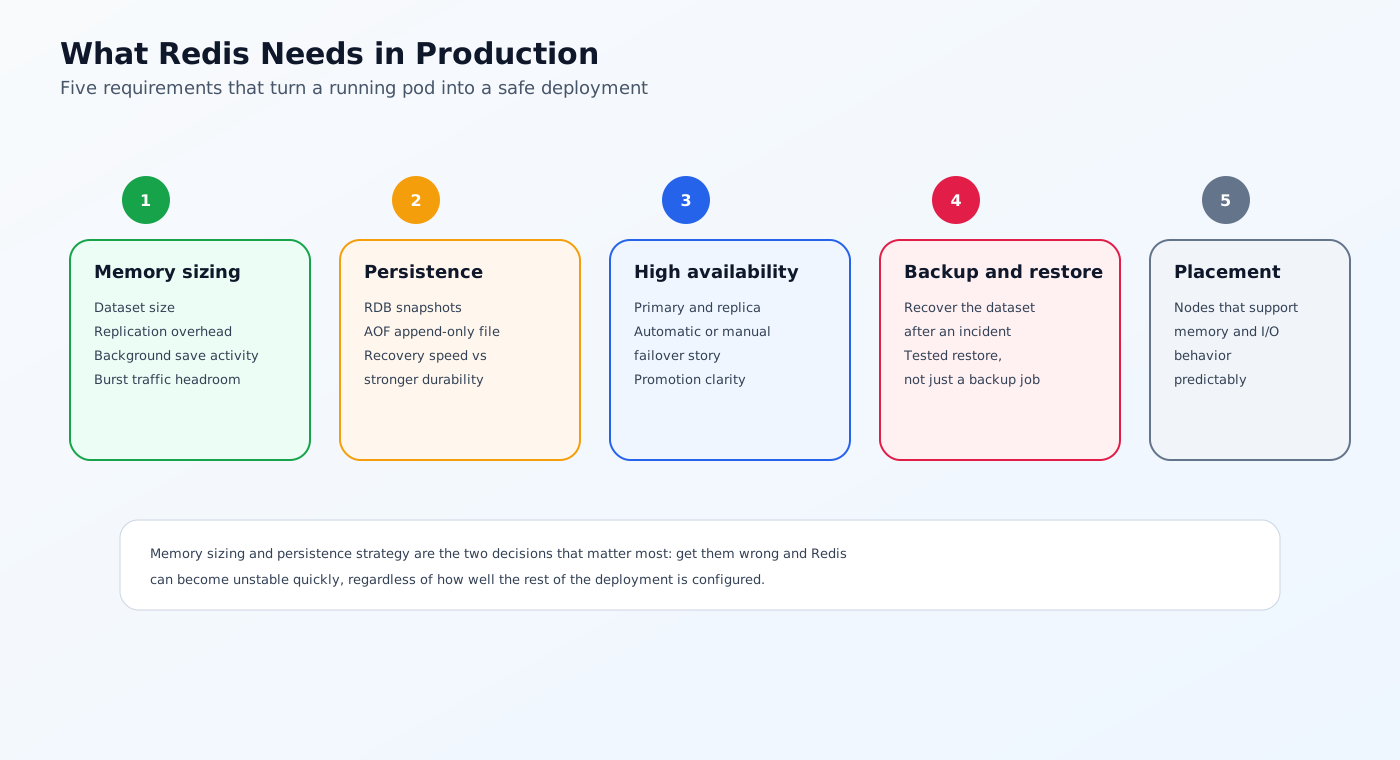
1. Memory sizing
Redis is memory-first. The database should be sized with enough headroom for:
- Dataset size
- Replication overhead
- Background save activity
- Burst traffic
- Eviction buffer
If Redis runs too close to the memory limit, it can become unstable quickly.
2. Persistence strategy
Redis persistence usually uses one or both of these:
- RDB snapshots
- AOF, or append-only file persistence
The right choice depends on whether the workload favors recovery speed or stronger durability.
3. High availability
If Redis is important to application uptime, the deployment needs a failover story.
4. Backup and restore
You should know how to recover the dataset after an incident, not just how to start the pod.
5. Correct workload placement
Redis should run on nodes that can support its memory and I/O behavior predictably.
Current Industry Standard Approaches
Most teams use one of several patterns.
1. Managed Redis outside Kubernetes
This is the simplest operationally.
Managed Redis services usually handle:
- Persistence
- Backups
- Replication
- Failover
- Patching
This is often the best fit when the team wants lower operational overhead.
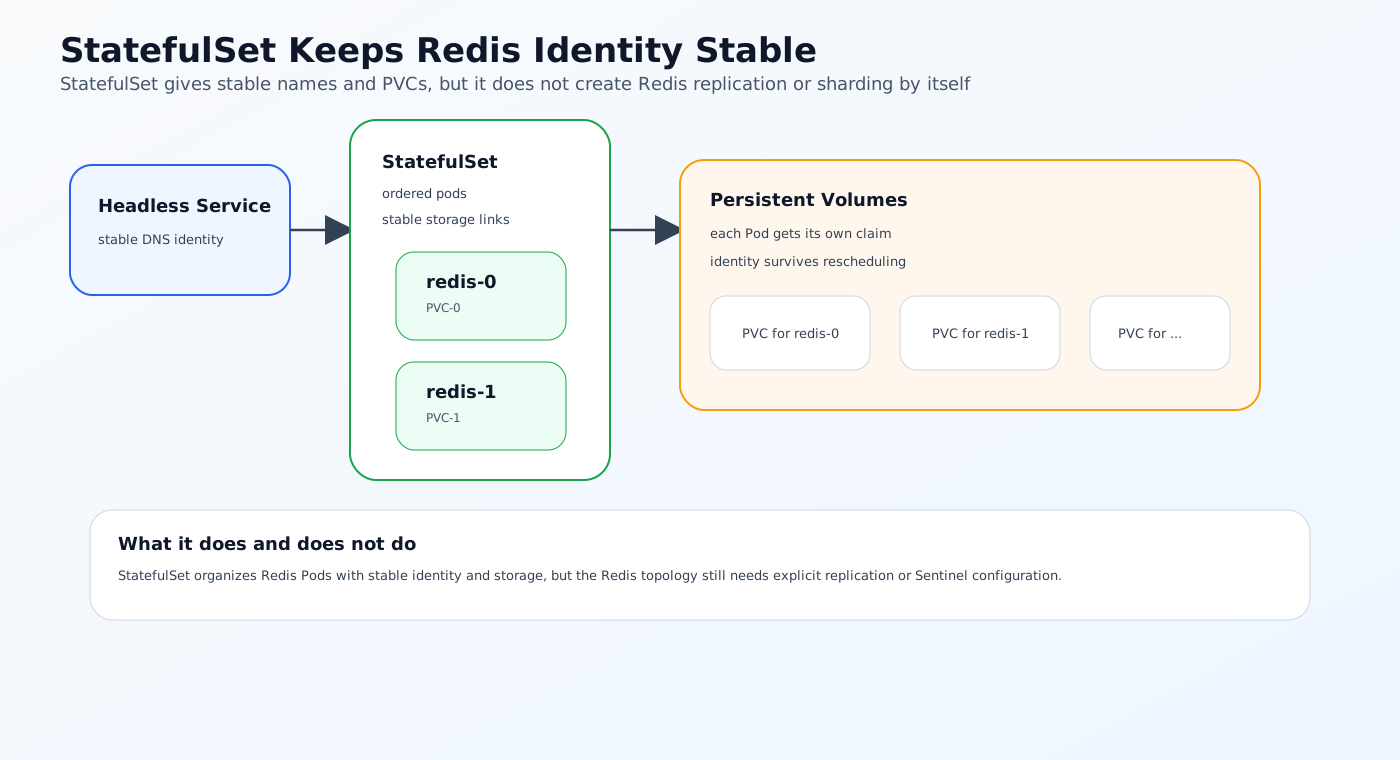
2. Redis on Kubernetes with a StatefulSet
Some teams deploy Redis with a StatefulSet and then add persistence, replication, and failover logic themselves.
This is workable for smaller or simpler environments, but it requires the platform team to own more of the operational details.
A StatefulSet gives Redis stable network identity and stable storage attachment, but it does not create Redis replication, Sentinel, or sharding by itself.
3. Redis operator or Helm-based deployment
Teams that want Kubernetes-native control often use an operator or a well-maintained Helm chart to automate:
- Primary and replica setup
- Persistence configuration
- Failover logic
- Service discovery
- Metrics and probes
4. Redis Cluster mode
For large or distributed workloads, Redis Cluster mode can shard data and improve scalability.
This adds more complexity, but it may be necessary when a single instance is not enough.
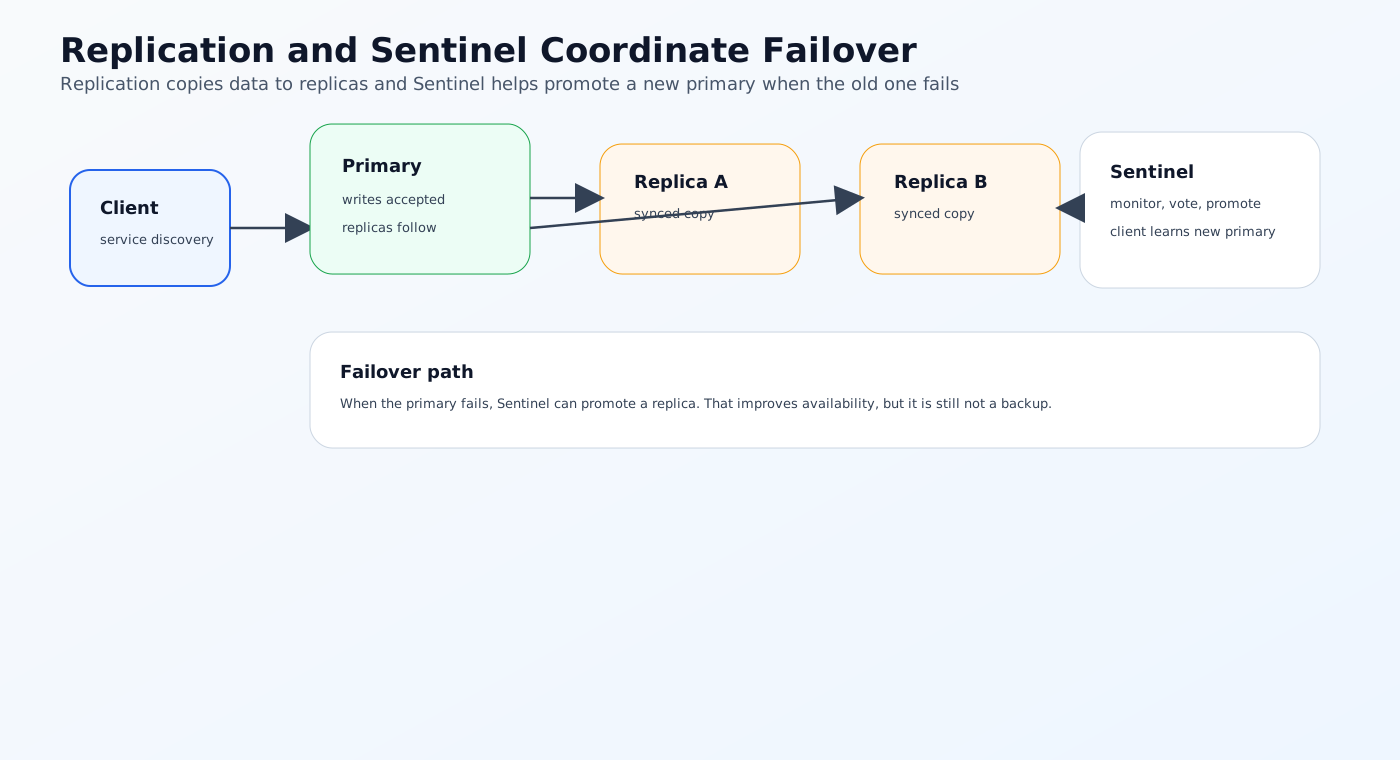
Redis Replication and Sentinel
Redis replication keeps one primary instance and one or more replicas.
Sentinel can monitor those instances, coordinate failover, and help clients discover the new primary after promotion.
Replication improves availability, but it is not a backup strategy. Sentinel also is not the same thing as Redis Cluster.
Failover helps recovery, but it does not guarantee zero data loss in every failure scenario.
Redis Cluster
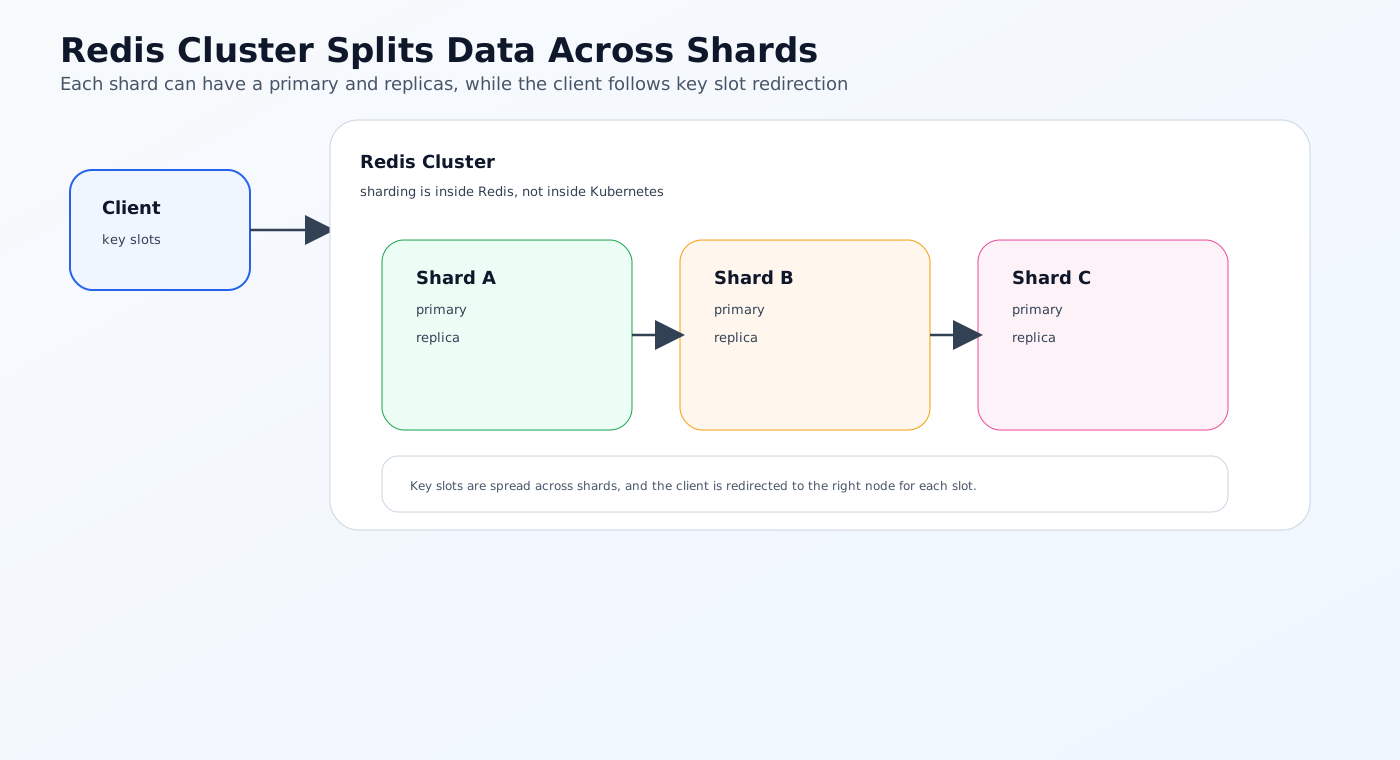
Redis Cluster distributes keys across shards.
Each shard can have a primary and replicas, and the client must understand cluster redirection and slot mapping. This is a Redis database topology, not a Kubernetes topology.
Running Redis Cluster on Kubernetes means placing a Redis cluster inside a Kubernetes cluster. The two systems solve different problems.
What Good Redis on Kubernetes Looks Like
If Redis is going to run safely in Kubernetes, the deployment should be explicit about how the workload behaves.
1. Use the right persistence model
Decide early whether Redis is:
- Disposable cache only
- Durable session store
- Critical queue or state backend
That decision affects whether you need RDB, AOF, or both.
2. Separate persistence from backup
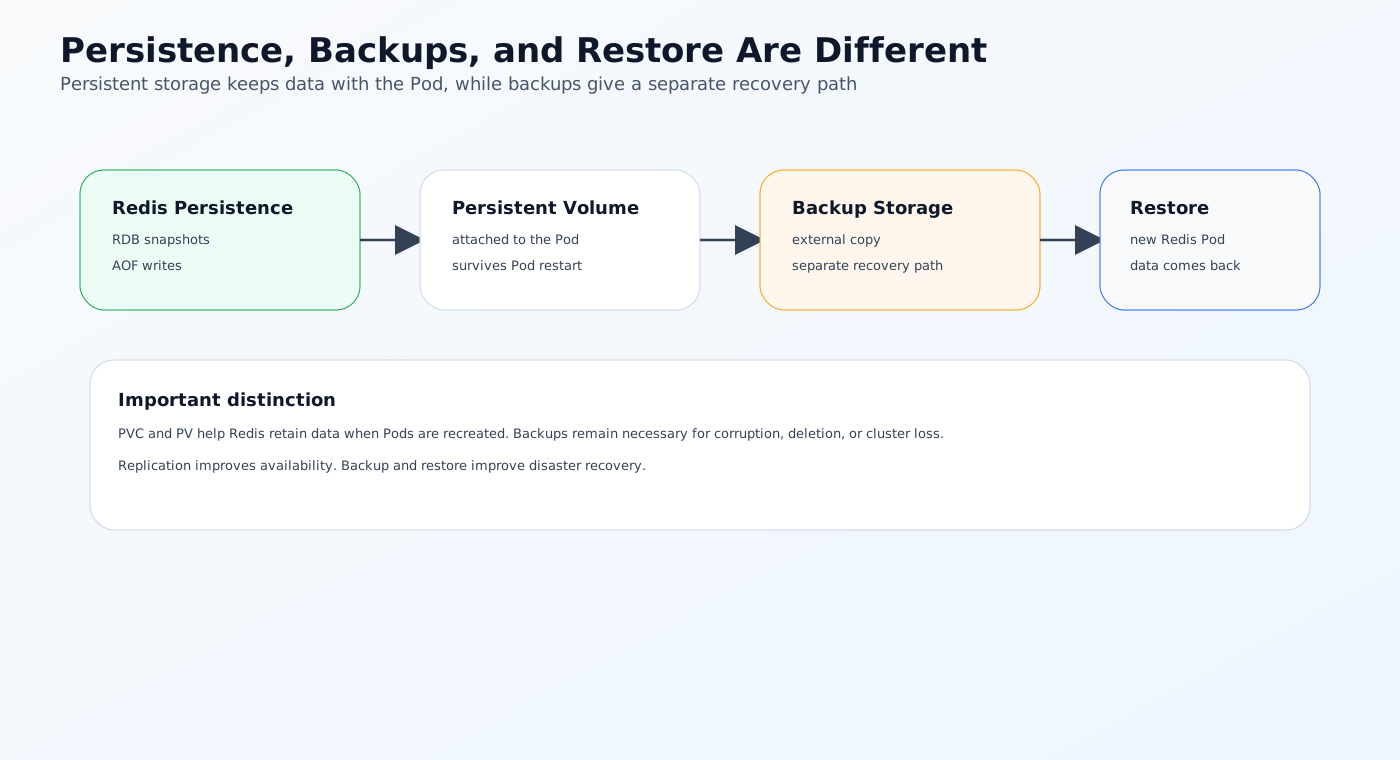
Persistent volumes help Redis retain data when Pods are recreated, but they do not replace external backups.
RDB creates periodic snapshots, AOF records write operations, and backups provide a separate recovery path if the cluster or storage fails.
3. Size memory with headroom
Redis should not run close to the edge of its memory limit.
Plan for:
- Dataset growth
- Replication overhead
- Temporary spikes
- Background save operations
4. Use probes carefully
Readiness and liveness probes should reflect actual service health, not just container startup.
5. Set anti-affinity or topology spread
Replicas should not all land on the same node if you want better failure tolerance.
6. Define resource requests and limits
This helps the scheduler place Redis on suitable nodes and avoids excessive pressure on shared infrastructure.
7. Test failover and restore
A deployment is not production-ready until the team has tested what happens after failure.
8. Monitor eviction and latency
Redis performance can degrade well before a full outage happens.
Common Redis Deployment Patterns
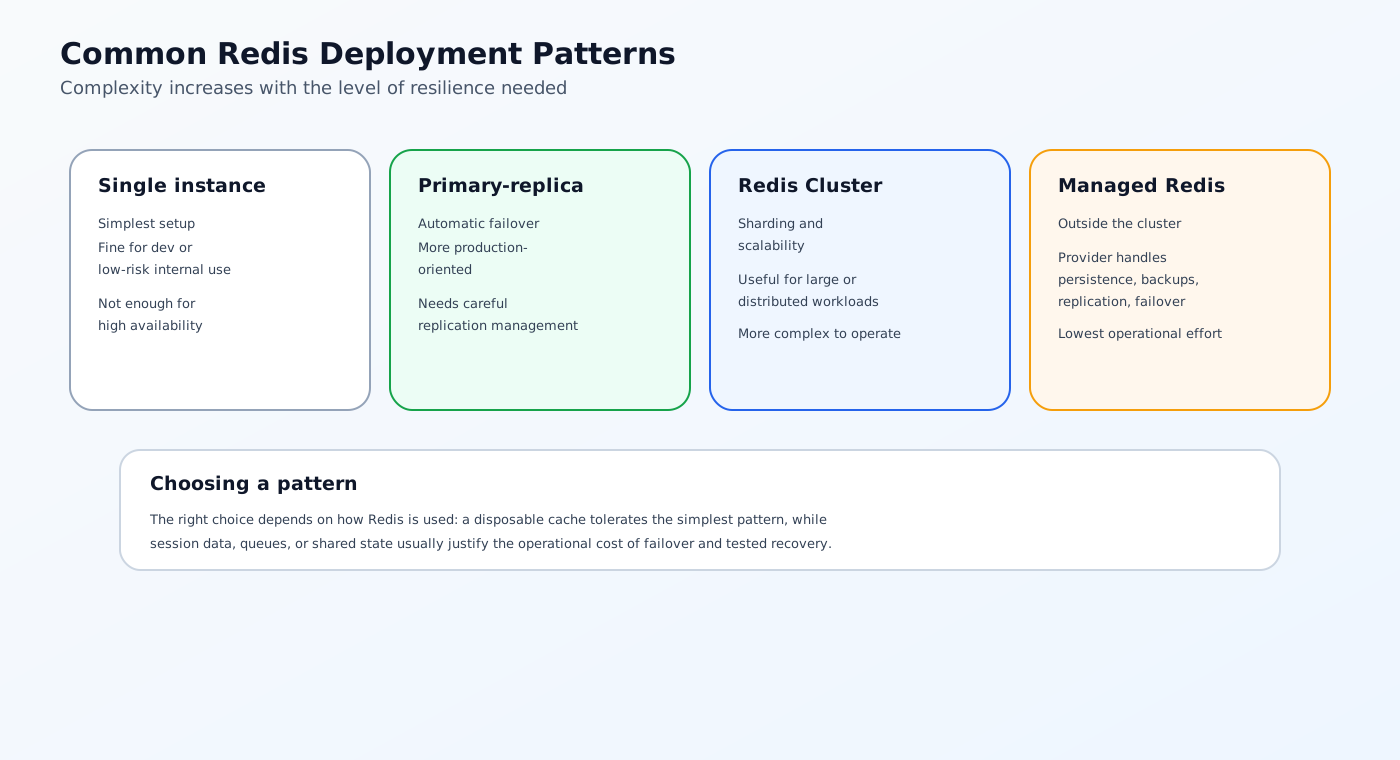
Single instance with persistence
This is the simplest setup and can work for development or low-risk internal workloads.
It is not enough for high availability.
Primary-replica with automatic failover
This is a more production-oriented approach.
It gives you better resilience, but it also requires careful management of replication, failover timing, and storage.
Redis Cluster
Cluster mode is useful when you need scaling and sharding, but it is more complex to operate.
Managed Redis plus Kubernetes workloads
Many teams keep Redis outside the cluster and use Kubernetes only for the application layer.
This can be the cleanest option when the team wants to avoid database-style operations on the cluster itself.
Limitations and Tradeoffs
Redis on Kubernetes can work well, but it is not always the best path for every team.
It adds operational complexity
You now own:
- Storage behavior
- Memory tuning
- Failover logic
- Backup and restore
- Pod placement
Memory pressure is easy to underestimate
Redis can fail fast if the cluster oversubscribes memory.
Persistence can affect performance
If persistence is configured poorly, durability may come at the cost of latency.
Not every Redis workload needs to live in the cluster
For some teams, managed Redis is the simpler and safer choice.
A Better Solution Approach
The right deployment model depends on how Redis is used.
Use managed Redis when you want less operational burden
This is often the simplest answer for small teams.
Use Kubernetes-native Redis when you need tighter platform integration
This is useful when you want GitOps, network policy, and workload management in the same control plane.
Use strong operational discipline regardless of the model
Monitor:
- Memory utilization
- Evictions
- Replication lag
- Failover behavior
- Persistence health
Treat Redis as a platform service
Redis should have:
- Clear ownership
- A runbook
- Backup and restore tests
- Defined SLOs
How NebuaCloud Fits Into This Model
This is where NebuaCloud fits naturally.
NebuaCloud is focused on Kubernetes management, GitOps workflows, multi-tenant infrastructure, and simplified deployment of production workloads. In a Redis deployment, that means the platform can help teams manage the surrounding operational concerns more consistently instead of treating Redis as a special case.
What this means in practice
NebuaCloud can help teams:
- Manage Kubernetes and k3s clusters that host stateful services like Redis
- Apply GitOps workflows to Redis manifests and configuration changes
- Support multi-tenant infrastructure with clearer boundaries around shared data services
- Use observability signals to detect memory pressure, rollout issues, or unhealthy replicas earlier
- Simplify deployment of production workloads while keeping Redis visible and manageable
That is useful when Redis needs to be part of a repeatable platform rather than a manually maintained dependency.
NebuaCloud also exposes cluster workload visibility for Pods, Services, and workloads, supports cluster namespace creation and active context switching, and provides cluster-level backup and restore flows through the platform API. Application Stacks can generate Kubernetes resources such as Deployments and Services from supported stack inputs.
Practical Example: Redis for Session Storage
Imagine a team using Redis for session data in a customer-facing application.
Safer deployment flow
- Provision a Kubernetes cluster with enough memory capacity.
- Deploy Redis using a StatefulSet or operator.
- Configure persistence based on recovery requirements.
- Set resource requests and limits with enough headroom.
- Add anti-affinity so replicas do not share the same failure domain.
- Test failover and restore before production.
- Monitor memory usage, replication lag, and eviction events.
Why this is safer
The team does not assume Redis is "just a cache."
They treat it like a production service that needs a clear recovery model and well-defined runtime behavior.
Conclusion
Redis can run safely on Kubernetes, but only when the deployment is designed around state, memory behavior, and recovery. The safest approach depends on how Redis is used: disposable cache, session store, queue backend, or shared service. In all cases, persistence, failover, sizing, and monitoring need to be deliberate.
For teams running Kubernetes and k3s in production, NebuaCloud can provide a natural operational layer for GitOps, observability, and multi-tenant infrastructure so Redis stays easier to operate safely.
Try it with NebuaCloud -> deploy in minutes
Current Availability
NebuaCloud already has real building blocks around this topic in the current codebase, including workload deployment paths, persistent storage configuration, resource metrics, and workload visibility in the dashboard.
At the same time, the full Redis operating model described in this article, especially around operator-driven failover, automated replica management, and a complete database safety workflow, is not yet exposed as a finished end-to-end NebuaCloud product capability today. Where those features are not directly available, they should be understood as future platform direction rather than current complete functionality.