How Do You Scale Kubernetes Applications Automatically?
Learn how Kubernetes application autoscaling works, including HPA, VPA, cluster autoscaling, metrics, and production scaling strategies for Kubernetes and k3s.
Automatic scaling is one of the main reasons teams adopt Kubernetes in the first place. When traffic changes, the platform should be able to add capacity without a manual ticket, and when demand drops, it should release resources instead of holding unnecessary cost.
In practice, scaling Kubernetes applications automatically is not a single feature. It is a combination of workload-level autoscaling, node-level capacity management, observability, and safe deployment practices. If any one of those pieces is missing, the system may scale poorly or not at all.
This article explains how Kubernetes autoscaling works, the standard approaches teams use today, where those approaches break down, and how to design a production workflow that scales cleanly across Kubernetes and k3s environments.
The Problem: Application Load Changes Faster Than Manual Operations Can Follow
Traffic does not stay flat for long. API usage increases during peak business hours, background jobs spike after a queue backlog, and internal tools sometimes see sudden bursts from batch processes or scheduled tasks.
If the platform does not react automatically, teams usually end up with one of two problems:
- The application becomes slow or unavailable under load
- The cluster is overprovisioned and wastes capacity when demand drops
Automatic scaling exists to handle that imbalance.
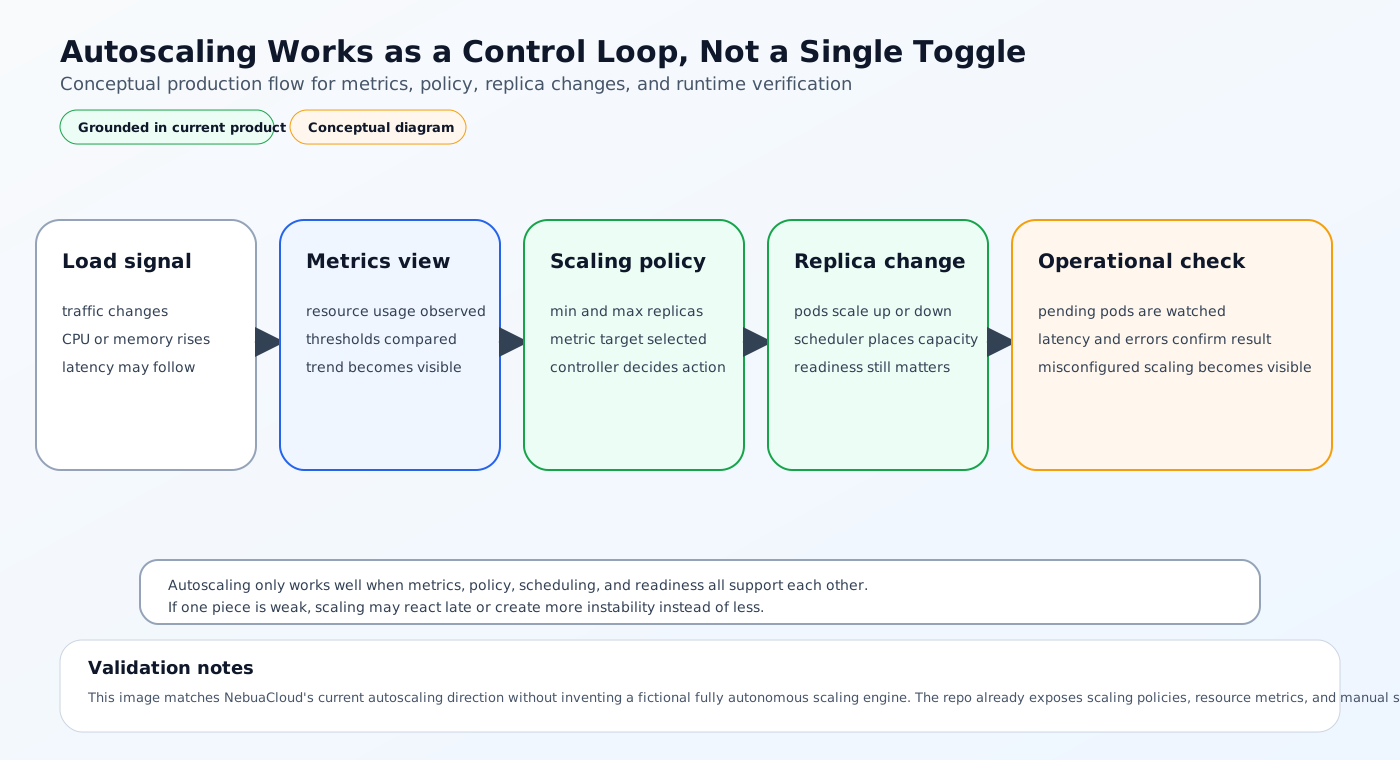
Why scaling is harder than it looks
Scaling is not just adding more pods.
A production-ready system has to account for:
- How workload metrics are measured
- Whether the application is stateless or stateful
- Whether new pods can actually be scheduled
- Whether the cluster has enough node capacity
- How fast the system reacts to traffic spikes
- How to avoid thrashing during rapid changes
That is why autoscaling in Kubernetes usually involves several controllers rather than one simple switch.
The Main Types of Kubernetes Autoscaling
Kubernetes scaling usually happens at three different levels.
1. Horizontal Pod Autoscaling
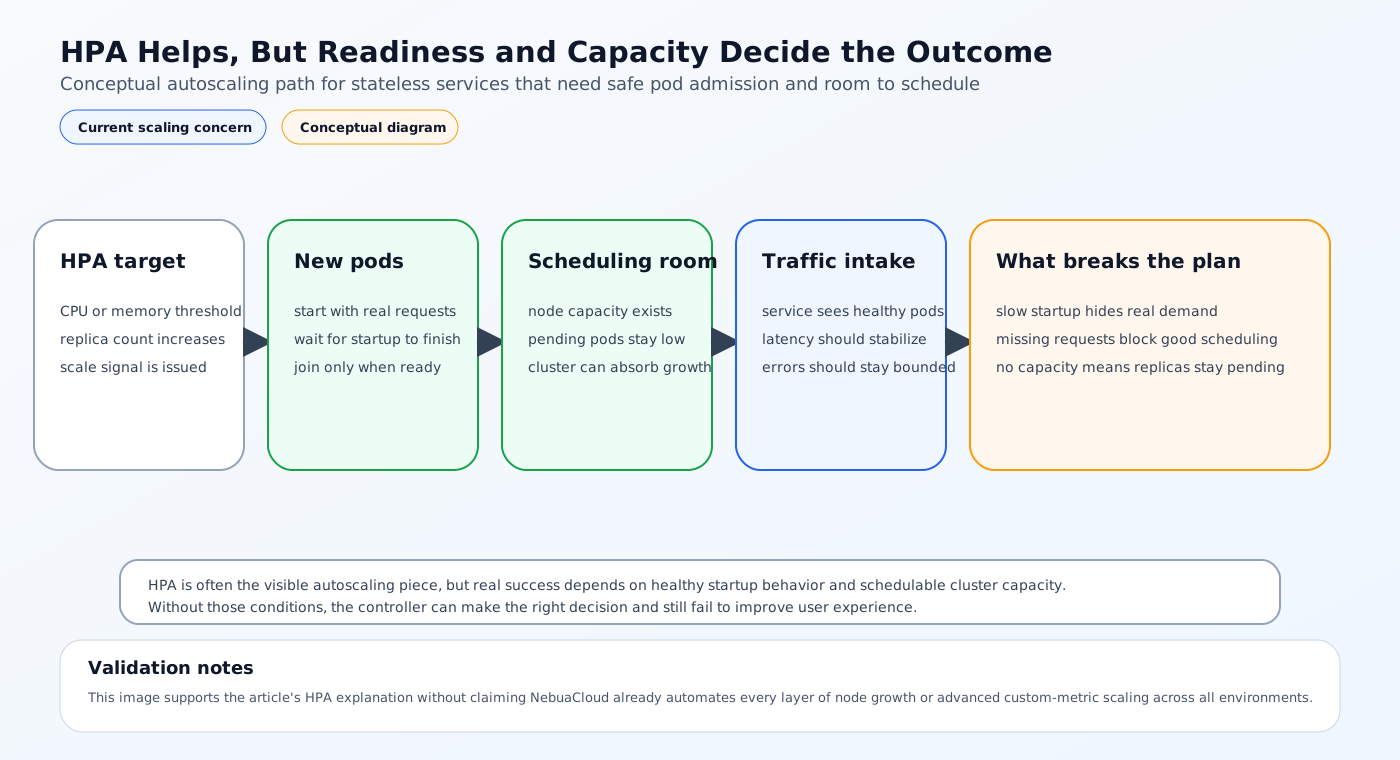
Horizontal Pod Autoscaling, or HPA, changes the number of pod replicas based on metrics such as CPU, memory, or custom application metrics.
This is the most common scaling method for stateless services.
How HPA works
- The HPA controller watches metrics for a workload.
- It compares those metrics to a target threshold.
- It increases or decreases the replica count.
- The Deployment creates or removes pods accordingly.
HPA is useful because it lets the application grow horizontally when demand increases.
Example HPA
apiVersion: autoscaling/v2
kind: HorizontalPodAutoscaler
metadata:
  name: web-app
spec:
  scaleTargetRef:
    apiVersion: apps/v1
    kind: Deployment
    name: web-app
  minReplicas: 2
  maxReplicas: 10
  metrics:
    - type: Resource
      resource:
        name: cpu
        target:
          type: Utilization
          averageUtilization: 70
2. Vertical Pod Autoscaling
Vertical Pod Autoscaling, or VPA, adjusts pod requests and limits instead of replica count.
This is useful when a workload needs more CPU or memory per pod rather than more pods.
VPA is common for applications where scaling out is less effective than giving each instance more resources.
3. Cluster Autoscaling
Even if HPA increases pod replicas, those pods still need node capacity.
Cluster autoscaling adds or removes nodes when the scheduler cannot place pending pods or when capacity is no longer needed.
This is the part that connects application demand to infrastructure capacity.
What Kubernetes Needs Before Autoscaling Works Well
Autoscaling depends on more than the controller itself.
Resource requests and limits
If pod requests are missing or unrealistic, the scheduler and autoscaler cannot make good placement decisions.
Requests should reflect real workload behavior so the platform knows how much capacity each pod needs.
Metrics availability
HPA usually depends on metrics from the metrics server or custom metrics pipeline.
Without useful metrics, the autoscaler has nothing to react to.
Readiness and startup behavior
If new pods are marked ready too early, traffic can be sent to them before dependencies are ready.
If they are marked ready too late, the autoscaler may scale out without the application actually absorbing traffic.
Safe rollout strategy
Scaling and deployment often happen together.
If new pods are rolled out during a traffic spike, the system needs to handle both the release change and the capacity change at the same time.
Current Industry Standard Approaches
Most teams use a mix of the following patterns.
HPA for application scaling
HPA is the default choice for stateless web services, APIs, and workers that can run multiple replicas.
It is simple, widely supported, and fits most Kubernetes workloads well.
VPA for sizing workloads
VPA is useful when the main problem is incorrect pod sizing rather than insufficient replica count.
Teams often use it during capacity tuning and then decide whether to keep it active continuously.
Cluster autoscaling for node capacity
Cluster autoscalers are commonly used in cloud environments where nodes can be added dynamically.
This is especially important for platforms with bursty traffic or many services competing for resources.
Custom metrics for business-aware scaling
CPU is not always the right signal.
Teams often scale on:
- Request rate
- Queue depth
- Active sessions
- Latency
- Custom application metrics
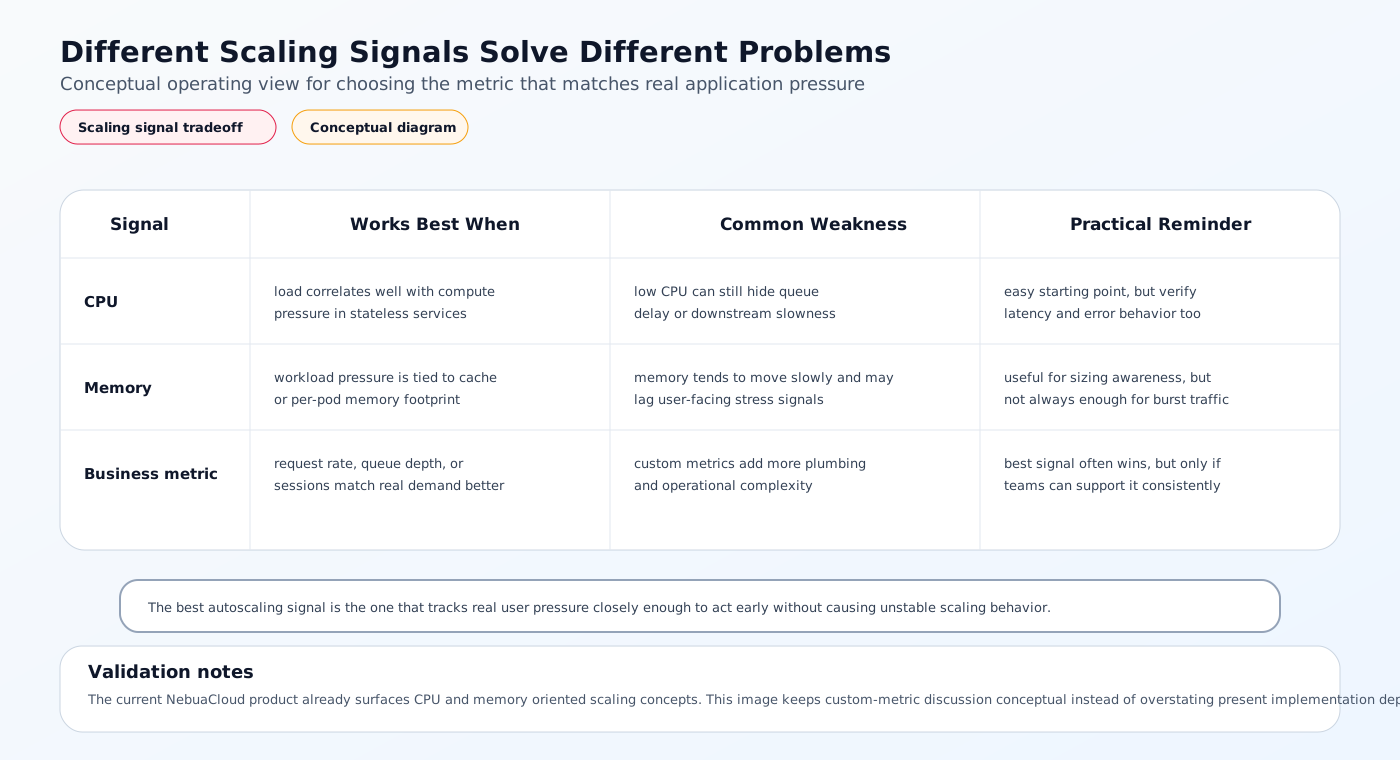
This is more accurate when CPU usage does not reflect real load.
Limitations of Common Autoscaling Strategies
Automatic scaling is useful, but it is not magic.
CPU-based scaling is often incomplete
CPU usage does not always track user experience.
For example, a service may have low CPU but high queue latency or slow downstream dependencies.
Scaling can lag behind traffic spikes
Autoscalers react after metrics move. If the application needs time to start or warm up, a sudden spike can still cause temporary degradation.
Stateful systems are harder to scale automatically
Databases, persistent queues, and systems with local state often need more careful planning than stateless services.
Cost can rise without proper guardrails
Autoscaling can improve availability but still waste money if minimum replicas or node pools are too high.
k3s environments still need the same scaling logic
k3s reduces infrastructure overhead, but the scaling model is still the same.
The controller still needs metrics, resource requests, and scheduling capacity.
A Better Solution Approach
The most reliable way to scale Kubernetes applications automatically is to treat scaling as part of the application contract.
1. Set realistic resource requests and limits
These values help the scheduler and autoscaler make good decisions.
2. Choose the right scaling signal
Use CPU when it matches load. Use memory when that better reflects pressure. Use custom metrics when business traffic is a better signal.
3. Combine HPA with cluster autoscaling
Application-level scaling is only useful if the cluster has room to grow.
4. Make startup and readiness explicit
Readiness probes, startup probes, and correct grace periods help new pods join traffic safely.
5. Use observability to validate behavior
Watch:
- Replica count
- Pending pods
- Latency
- Error rate
- Node pressure
- Scheduling failures
Scaling should be measured, not assumed.
How NebuaCloud Fits Into This Model
Once autoscaling is understood as a full operational workflow, the next challenge is managing it consistently across clusters, environments, and tenants. That is where NebuaCloud fits naturally.
NebuaCloud is focused on Kubernetes management, GitOps workflows, multi-tenant infrastructure, and simplified deployment of production workloads. In an autoscaling context, that means the platform can help teams operate the signals, policies, and workflows around scaling rather than treating scaling as an isolated feature.
What this means in practice
NebuaCloud can help teams:
- Manage Kubernetes and k3s clusters that need consistent scaling behavior
- Apply GitOps workflows to autoscaling manifests and workload changes
- Use observability signals to detect when scaling is lagging or misconfigured
- Support multi-tenant infrastructure where different workloads scale independently
- Simplify the operational model for production services that need frequent capacity changes
That is useful when the challenge is not just “how do we add replicas?” but “how do we keep scaling behavior predictable across the platform?”
Practical Example: Autoscaling a Production API
Consider a public API that sees steady traffic during the day and heavier load during business hours.
Step 1: Define workload requests
The Deployment sets realistic CPU and memory requests so the scheduler knows how much capacity each pod needs.
Step 2: Add readiness and startup probes
The API should only receive traffic when it is fully initialized and able to serve requests.
Step 3: Configure HPA
An HPA watches CPU or request-based metrics and increases replicas when load rises.
Step 4: Ensure the cluster can grow
Cluster autoscaling or spare node capacity must exist so the new pods can actually be scheduled.
Step 5: Monitor the results
The team watches:
- Pod count
- Pending pods
- Request latency
- Error rate
- Node utilization
If the deployment scales but latency still rises, the problem is not the HPA alone. It may be application architecture, downstream dependency bottlenecks, or insufficient cluster capacity.
Conclusion
Scaling Kubernetes applications automatically is not one feature. It is a system of controllers, metrics, scheduling, and operational guardrails.
For most teams, the practical pattern is straightforward: use HPA for replica scaling, cluster autoscaling for node capacity, and observability to confirm the behavior is actually working. Add VPA or custom metrics when the workload needs it, and always treat resource requests, readiness, and rollout behavior as part of the design.
For teams running Kubernetes and k3s in production, NebuaCloud can provide a natural operational layer for GitOps, autoscaling workflows, multi-tenant infrastructure, and day-2 operations across clusters.
Try it with NebuaCloud -> deploy in minutes
Current Availability
NebuaCloud already has meaningful autoscaling-related functionality in the current codebase. The product exposes auto-scaling dashboard flows, scaling policies with replica ranges and CPU/memory targets, resource metrics, and read-only visibility into real cluster HPAs. Applying a policy's replica bounds to a cluster's HorizontalPodAutoscaler is wired through the agent, so HPA configuration is a real, working path today.
A one-shot "scale to N replicas now" manual action, VPA support, unattended policy-driven auto-scaling execution, and usage-trend-based scaling recommendations are not yet wired to a real cluster action or backed by persisted historical metrics. Those capabilities should be understood as future platform direction rather than current functionality.