Pods, Deployments and Services Explained With Examples
A practical explanation of Kubernetes Pods, Deployments, and Services with examples, showing how they work together in production and GitOps workflows.
If you are learning Kubernetes, three objects appear almost immediately: Pods, Deployments, and Services. They are often introduced together, which can make them feel interchangeable. They are not.
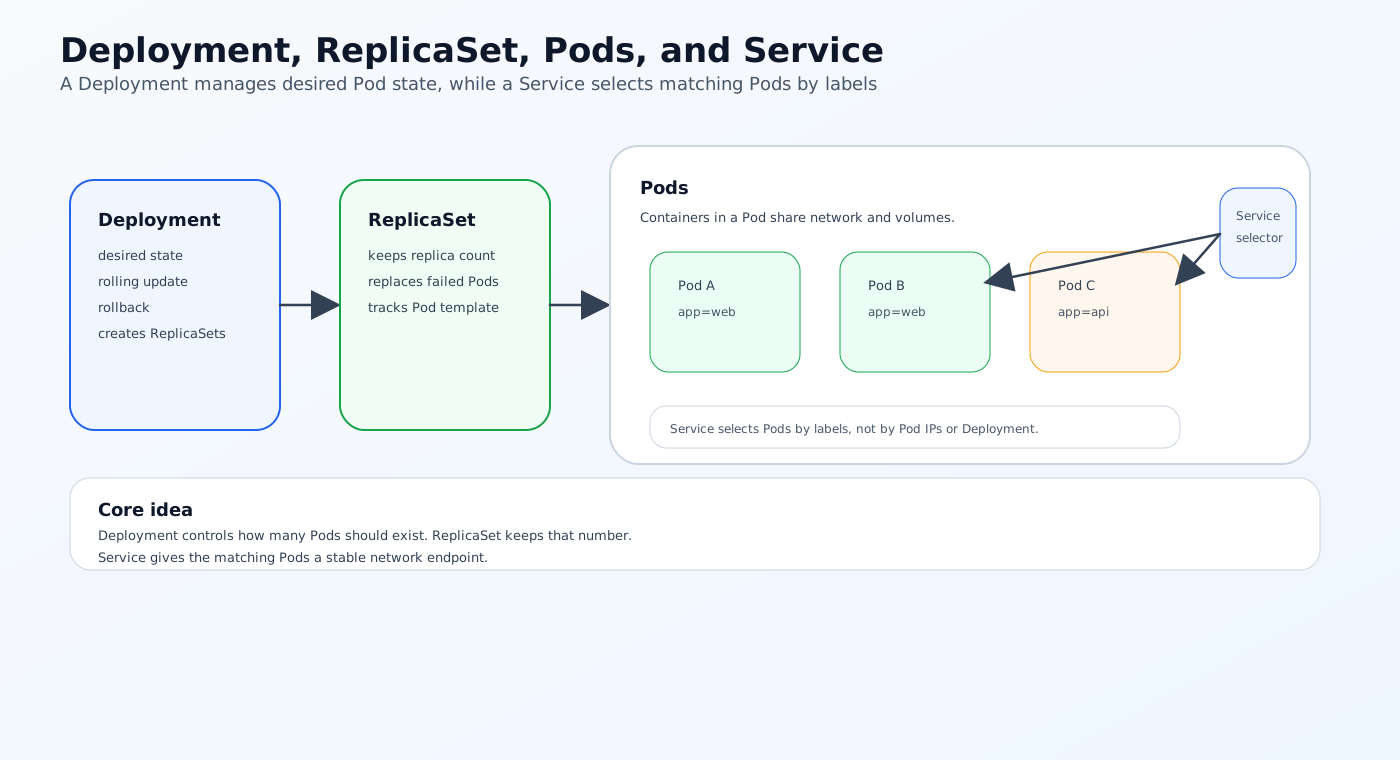
A Pod runs one or more containers. A Deployment manages the desired state and lifecycle of Pods. A Service gives those Pods a stable network endpoint. Once you understand that division of responsibility, Kubernetes manifests become much easier to read and production debugging becomes less confusing.
This article explains Pods, Deployments, and Services in practical terms, shows how they work together, and connects them to real DevOps workflows such as GitOps, multi-cluster operations, and production deployment patterns.
The Problem: Kubernetes Objects Are Easy to Mix Up
Many teams first meet Kubernetes through a single YAML file. The file may define a Deployment, a Service, or both, and the differences are not always obvious at first glance.
The confusion usually comes from three questions:
- Why not run containers directly instead of using a Pod?
- Why do we need a Deployment if the Pod already runs the app?
- Why does the app need a Service if the Pod already has an IP address?
The answer is that each object solves a different problem.
Why this matters in production
In a development cluster, a single Pod may be enough to demonstrate that the application works.
In production, you need:
- Self-healing when containers fail
- Controlled rollouts and rollbacks
- Stable service discovery
- Horizontal scaling
- Clear separation between the workload and the network endpoint
Pods, Deployments, and Services map neatly onto those requirements.
What Is a Pod?
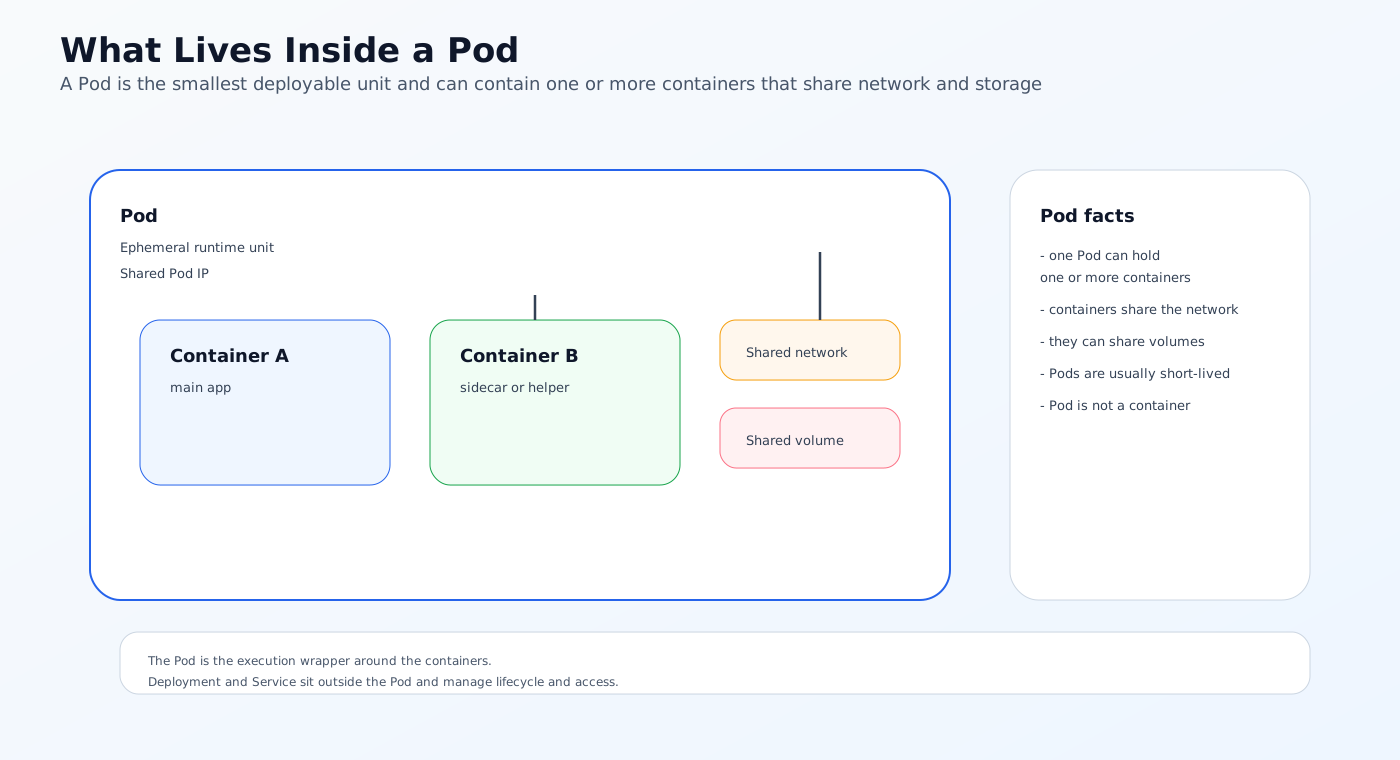
A Pod is the smallest deployable unit in Kubernetes. It usually contains one main container, although sidecars and helper containers are also common.
Think of a Pod as the execution wrapper around your application container.
What a Pod provides
A Pod gives containers:
- A shared network namespace
- Shared storage volumes
- A shared lifecycle
- A single IP address inside the cluster
This is useful when multiple containers need to cooperate closely, such as an application container and a sidecar for logging, proxying, or metrics.
Pods are ephemeral. A Pod by itself does not provide controlled updates or replica management. It also is not the same thing as a container.
Simple Pod example
apiVersion: v1
kind: Pod
metadata:
  name: demo-pod
spec:
  containers:
    - name: web
      image: nginx:1.27
      ports:
        - containerPort: 80
This Pod can run NGINX, but it has one major limitation: if it dies, Kubernetes will not manage a replacement strategy for you beyond the Pod object itself. That is where Deployments come in.
What Is a Deployment?
A Deployment manages one or more Pods through a higher-level controller.
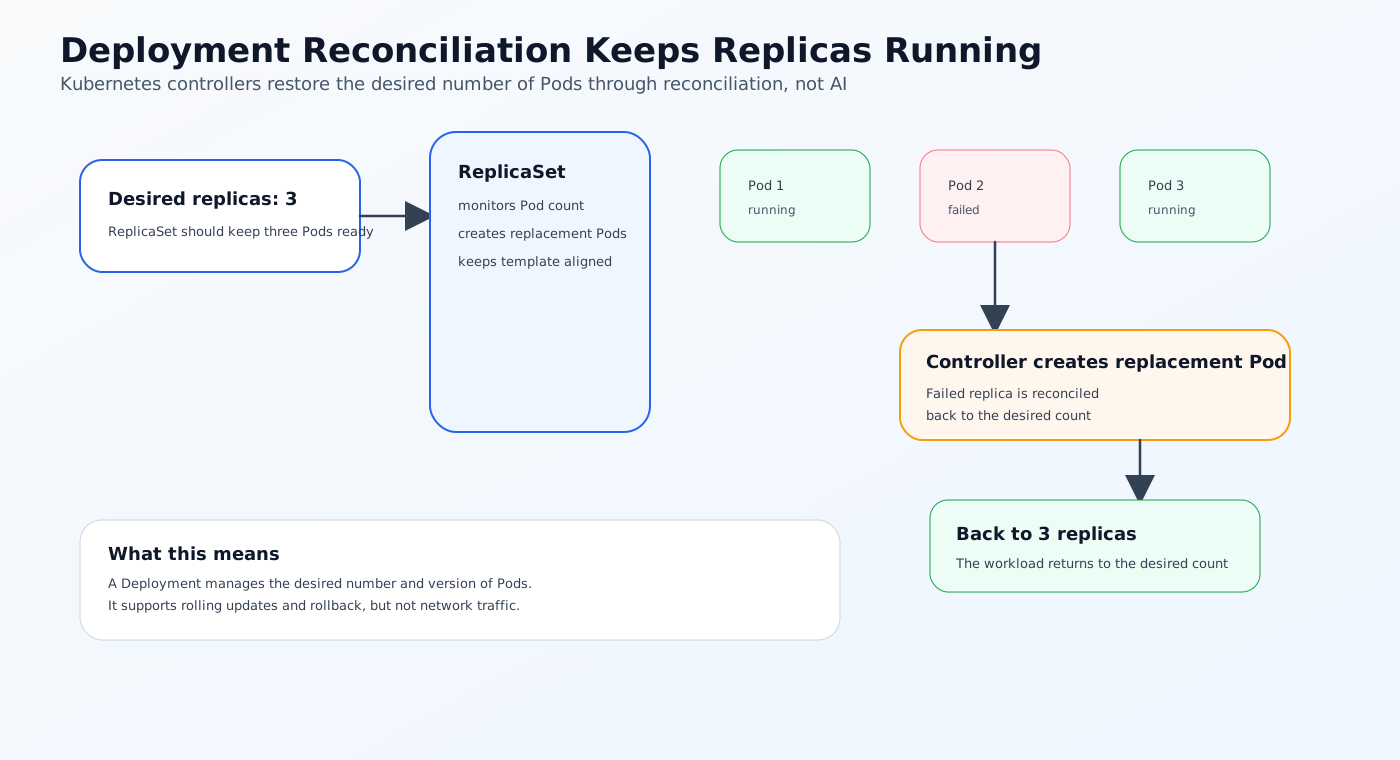
Its job is to keep the declared number of replicas running and to handle changes safely when the desired state changes.
What a Deployment does
A Deployment is responsible for:
- Creating ReplicaSets
- Maintaining the desired replica count
- Rolling out updates gradually
- Rolling back to previous versions
- Replacing failed Pods
It does not distribute network traffic. It does not act as a load balancer. Those responsibilities belong to the Service and exposure layers.
This is why Deployments are usually the default choice for stateless applications in Kubernetes.
Kubernetes controller reconciliation handles failed Pods automatically based on the declared desired state. That behavior is standard Kubernetes control logic, not AI.
Simple Deployment example
apiVersion: apps/v1
kind: Deployment
metadata:
  name: web-app
spec:
  replicas: 3
  selector:
    matchLabels:
      app: web-app
  template:
    metadata:
      labels:
        app: web-app
    spec:
      containers:
        - name: web
          image: nginx:1.27
          ports:
            - containerPort: 80
In this example:
replicas: 3tells Kubernetes to keep three Pods running- The
templatedefines the Pod that the Deployment will create - The labels tie the Deployment to the Pods it manages
Why Deployments matter
Without a Deployment, you can create a Pod, but you do not get the same level of resilience or rollout control.
Deployments are what make Kubernetes useful for day-2 operations:
- Updating image versions safely
- Replacing unhealthy Pods
- Keeping the app available during changes
- Scaling based on demand
What Is a Service?
A Service gives a stable network identity to a set of Pods.
Pods are ephemeral. They can be rescheduled, recreated, or replaced at any time. Their IP addresses change. A Service hides that volatility and gives clients a stable way to reach the application.
What a Service does
Services provide:
- Stable virtual IPs or DNS names inside the cluster
- Load balancing across matching Pods
- Separation between clients and Pod lifecycle
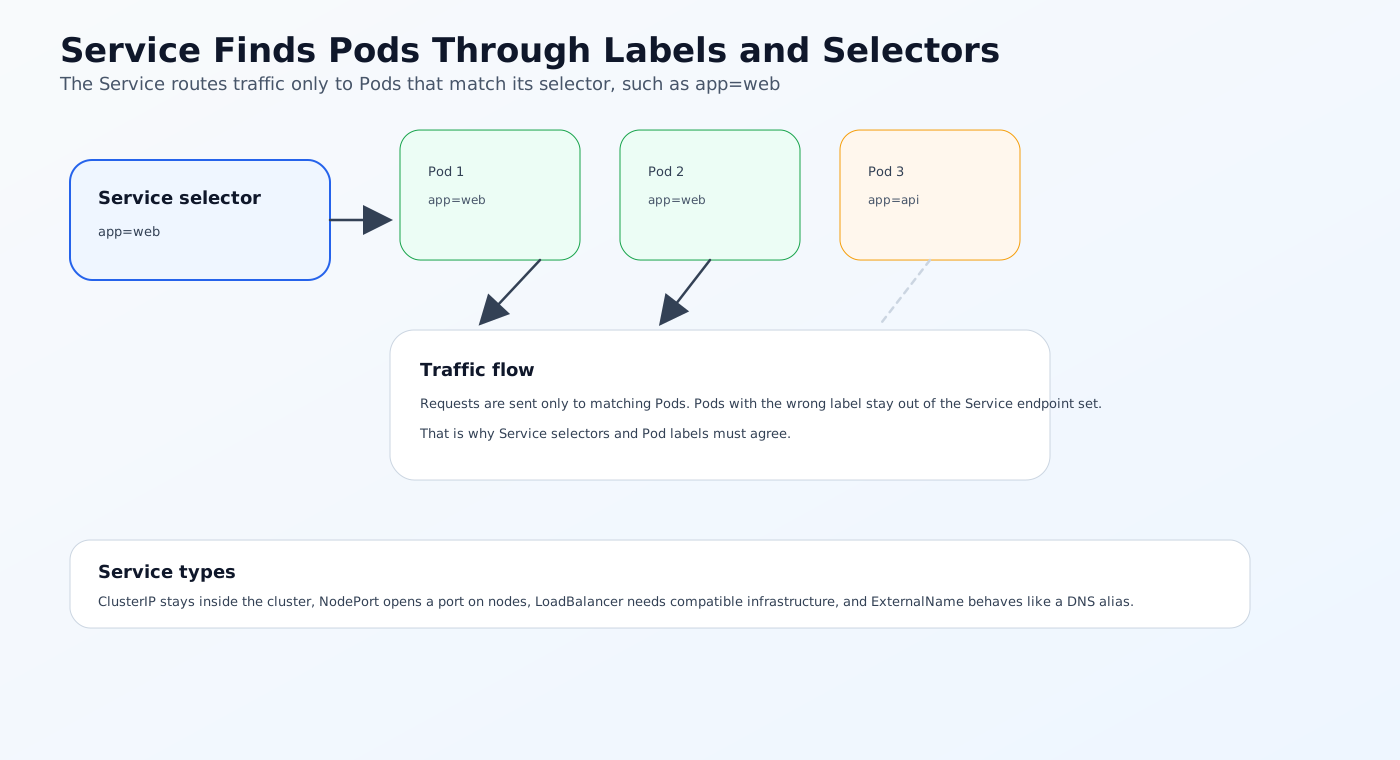
- Selection of Pods through labels and selectors
Simple Service example
apiVersion: v1
kind: Service
metadata:
  name: web-app
spec:
  selector:
    app: web-app
  ports:
    - port: 80
      targetPort: 80
  type: ClusterIP
This Service looks for Pods with the label app: web-app and sends traffic to port 80 on those Pods.
Services select Pods through labels and selectors. The Service does not point at the Deployment object itself, and it does not create Pods.
Service types
ClusterIPexposes the Service inside the clusterNodePortexposes a port on the nodesLoadBalancerdepends on compatible infrastructureExternalNamebehaves differently and maps to DNS rather than matching Pods directly
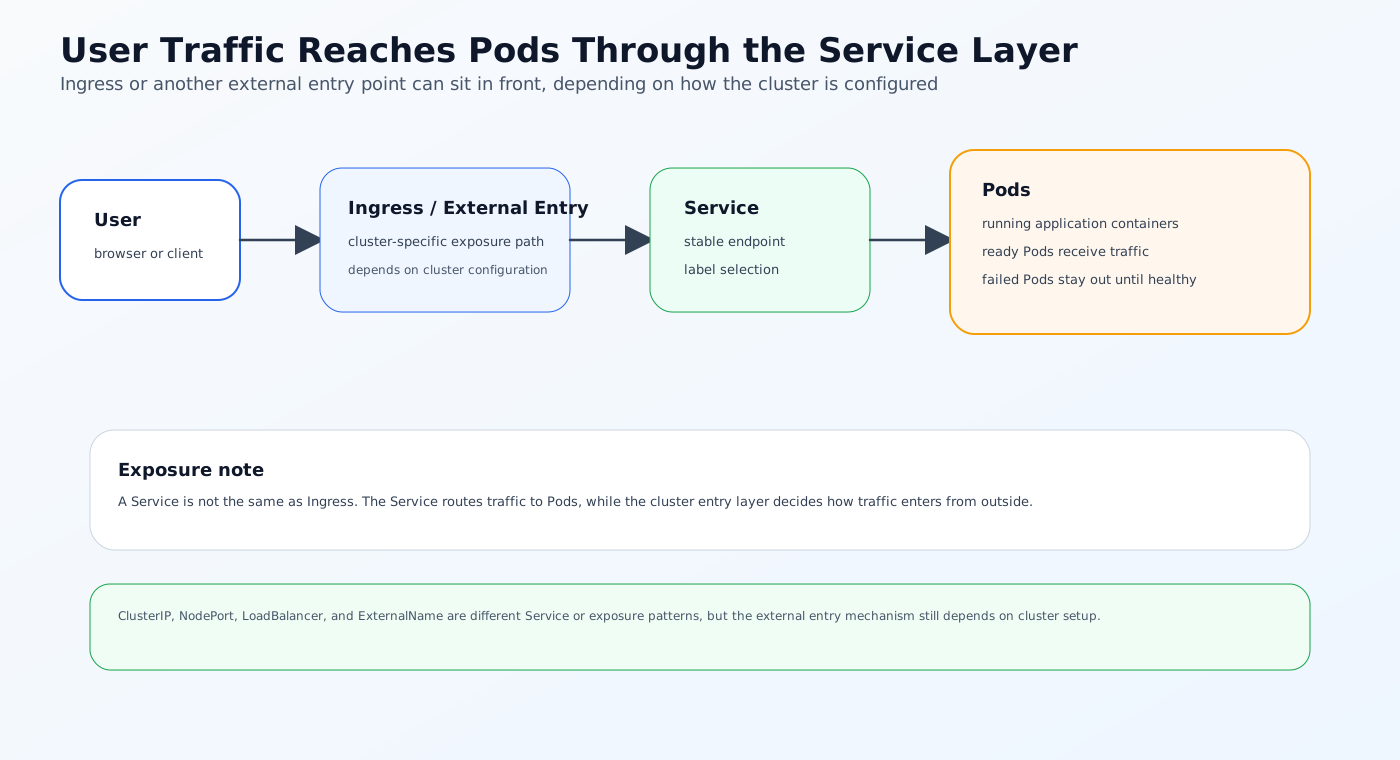
Services do not replace Ingress. Ingress or another external entry layer decides how traffic enters the cluster.
Why Services are necessary
If clients talked directly to Pod IPs, every restart or reschedule would break the connection model.
Services solve that by giving applications a stable address, usually reachable through Kubernetes DNS as web-app.default.svc.cluster.local or similar.
How Pods, Deployments, and Services Work Together
The relationship is easier to understand if you read them as a sequence:
- The Deployment defines the desired application state.
- The Deployment creates Pods from a Pod template.
- The Service selects those Pods by label.
- Traffic reaches the Service, which routes it to healthy Pods.
That is the basic production pattern for many Kubernetes applications.
Example workflow
Imagine a simple API service:
- The Deployment ensures three replicas run
- The Pods host the API container
- The Service gives the API a stable cluster address
- An Ingress object may expose the Service outside the cluster
This design separates concerns cleanly:
- The Pod is about execution
- The Deployment is about lifecycle
- The Service is about networking
Current Approaches Teams Use in Practice
Most production teams build around this same pattern, even if the surrounding tooling changes.
Stateless apps on Deployments
Web APIs, frontends, workers, and internal services usually run as Deployments because they benefit from self-healing and rolling updates.
Stateful workloads with more careful planning
Databases and queues may still use Pods or StatefulSets, but they usually need stronger storage and identity guarantees than a simple stateless Deployment.
GitOps-managed manifests
In many DevOps environments, the Deployment and Service objects live in Git and are applied through a GitOps controller.
That gives teams:
- Reviewable changes
- Audit history
- Drift control
- Repeatable promotion between environments
Lightweight clusters such as k3s
These primitives work the same way in k3s and upstream Kubernetes. The distribution changes the operational footprint, not the core object model.
That is why teams often use the same Deployment and Service manifests across development, edge, and production environments.
Limitations of the Basic Model
Pods, Deployments, and Services are foundational, but they do not solve everything on their own.
Pods are not a complete production unit
A Pod is too low-level to manage most production workloads by itself. If a Pod dies, you want a controller to recreate it.
Deployments do not provide stable network identities
Deployments manage lifecycle, not networking. Without a Service, other workloads would need to track changing Pod IPs.
Services do not manage application health
A Service routes traffic, but it does not decide whether the Pods behind it are healthy in the business sense. You still need readiness probes, monitoring, and rollout controls.
Multi-tenant environments need more than basic objects
If several teams or customers share a cluster, the platform also needs RBAC, quotas, network policies, and sometimes stronger isolation boundaries.
Solution Approach: Design the Workflow Around the Objects
The cleanest Kubernetes design is to treat each object as one layer of the system.
Pod: the runtime layer
Use Pods as the execution target for your containerized application.
Deployment: the operational layer
Use Deployments to manage replicas, updates, and recovery.
Service: the access layer
Use Services to expose the application inside the cluster and give clients a stable endpoint.
Add GitOps for control
Store the manifests in Git so changes are reviewed, versioned, and reproducible.
This is the model most production teams eventually converge on because it scales better than ad hoc kubectl workflows.
How NebuaCloud Fits Into This Model
Once you understand Pods, Deployments, and Services, the next challenge is operating those workloads consistently across clusters and teams. That is where NebuaCloud fits naturally.
NebuaCloud is focused on Kubernetes management, GitOps workflows, multi-tenant infrastructure, and simplified deployment of production workloads. In a platform using Deployments and Services, that means the surrounding operational layer can be handled more consistently.
What this means in practice
NebuaCloud can help teams:
- Manage Kubernetes and k3s clusters from one operational layer
- Apply GitOps workflows to Deployment and Service manifests through stack-based deployment paths
- Support multi-tenant infrastructure with stronger boundaries
- Surface observability signals when workloads drift or fail
- Simplify promotion between environments and clusters
NebuaCloud also exposes real cluster workload visibility for Pods, Services, and workloads, and it can create namespaces and manage application stacks that compile into Kubernetes Deployments and Services. What it does not currently expose as a fully generic native UI workflow is direct standalone CRUD for arbitrary Pods, Deployments, and Services in the same way Kubernetes does at the API level.
This is useful when the application objects themselves are straightforward, but the operational model around them needs to scale.
Practical Example: A Web App in Kubernetes
Here is a simple production-style setup for a web application.
Deployment
apiVersion: apps/v1
kind: Deployment
metadata:
  name: frontend
spec:
  replicas: 2
  selector:
    matchLabels:
      app: frontend
  template:
    metadata:
      labels:
        app: frontend
    spec:
      containers:
        - name: app
          image: ghcr.io/example/frontend:1.0.0
          ports:
            - containerPort: 3000
          readinessProbe:
            httpGet:
              path: /health
              port: 3000
Service
apiVersion: v1
kind: Service
metadata:
  name: frontend
spec:
  selector:
    app: frontend
  ports:
    - port: 80
      targetPort: 3000
  type: ClusterIP
What happens here
- The Deployment keeps two Pods running
- The Pods run the application container
- The readiness probe prevents traffic from reaching unhealthy Pods
- The Service exposes the Pods on a stable cluster address
If you later change the image tag, Kubernetes rolls the update through the Deployment without changing how clients reach the app.
Conclusion
Pods, Deployments, and Services are the core building blocks of everyday Kubernetes work.
- Pods run the container
- Deployments manage Pod lifecycle and updates
- Services provide stable network access
Once that separation is clear, Kubernetes manifests become much easier to understand, and production workflows become easier to design.
For teams running Kubernetes and k3s in production, NebuaCloud can provide a natural operational layer for GitOps, cluster management, multi-tenant infrastructure, and workload delivery around those core objects.
Try it with NebuaCloud -> deploy in minutes
Current Availability
NebuaCloud currently provides cluster-level visibility into Pods, Services, and workloads, plus namespace creation, cluster context switching, GitOps-backed stack deployment, and application workflows that can generate Deployments and Services.
Direct standalone CRUD for arbitrary Pods, Deployments, and Services is not currently exposed as a fully generic native platform feature. This article therefore explains standard Kubernetes behavior first and then maps only the confirmed NebuaCloud capabilities to those objects.